What started out as a software package to train medical device representatives for the OR has evolved into a program to train OR personnel to scrub and support a “rep-less” model.
The software, designed by a former perioperative nurse, helps orient staff to new procedures, documents their competency, and streamlines instrument tray use and processing.
Larry Foster, BS, RN, spent 26 years in orthopedic device sales, marketing, and professional education before starting his own company—S2 Interactive in Germantown, Tennessee (https://www.google.com/?gws_rd=ssl#q=s2+interactive).
“I thought my market was going to be the device companies, but when I showed the software to nurses 2 years ago, they overwhelmingly told me they needed it for OR staff training,” he told OR Manager.
Foster, president and CEO of S2 Interactive, went back to the drawing board, and in the summer of 2014, S2 launched Virtual Backtable 3.0.

Surgeon-specific library of procedures. (All images courtesy of S2 Interactive, Germantown, Tennessee.)
“The main use of the Virtual Backtable is to educate and rapidly train OR staff to scrub and manage procedures,” says Foster.
The program shows surgeons’ preferences with images or videos, instrumentation sequences for specific procedures, the exact location for each instrument in a tray, and special instructions for instrument assembly or setup.
Foster and his team photograph instrument trays, single instruments, and equipment and then load the images into the software. OR staff help write case- and surgeon-specific instrumentation sequences as well as information from preference cards such as patient positioning and skin prep. This information is provided to the S2 team, and their proprietary process enters it into the software within 24 to 36 hours.
“We are not trying to duplicate the preference cards,” he says, “we just want them to put in some important things they need to know about covering the case.”
Users can view the Virtual Backtable on an iPad or personal computer (PC). Because the application is cloud-based, staff can practice for cases at the hospital or at home. If a staff member wants to use the Virtual Backtable to set up a case, the iPad can be clamped to an IV pole and covered with a sterile drape. Foster provides iPads, clamps, and sterile drapes for each account.
To begin using the Virtual Backtable, staff members go to the hospital’s own surgeon-specific library (see image above). Procedures are categorized by surgeon, and a photograph of the surgeon is included.
They can visualize the instrument sequence for the procedure and the instrument trays. To find out which tray an instrument is in, they touch the instrument and an arrow points to its location in a tray (see image above).
They drag procedure-specific instruments out of the trays onto an area in the software called “the mat,” just as they would take instruments out of a tray and set them on the backtable or Mayo stand in a real case.
They practice placing the instruments in the surgeon-specific sequence, and the software grades them on how well they do. When finished, they hit “score my assessment,” and they are automatically given a score on the first 10 instruments and then a score on the rest of the procedure (see image on p 7). Foster says he decided to highlight the first 10 instruments because, in his experience, if he got the first 10 instruments right, “the atmosphere in the OR was much more positive.”
Scores are saved in the database for future reference, and staff members can print the score and show it to surgeons and OR managers to demonstrate competency in the procedure. “The surgeons really like this,” says Foster. “The OR managers also like this,” he says, “because they are seeing new people competent to scrub for a case in 2 weeks rather than the typical 6 months.”

When staff touch an instrument, an arrow points to its location in a tray.
Pam Parnell, MBA, BHA, RN, administrative director of nursing at Methodist Le Bonheur Germantown in Germantown, Tennessee, was one of Foster’s first hospital customers and has helped him with the evolution of the Virtual Backtable software.
The chief surgeon at Methodist told Parnell about the Virtual Backtable after hearing about it while playing golf with Foster. “I thought, this is exactly what we need to orient techs to scrubbing,” says Parnell.
Staff for the 16-room OR include 20 RNs and 25 scrub technologists. They perform about 1,000 cases per month that include all services except transplants and neuro.
“Traditionally,” says Parnell, “we have assigned techs to a preceptor who double-scrubbed with them, and we hoped the techs wouldn’t be scared to death or the surgeon wouldn’t get too frustrated.”
With the Virtual Backtable, technologists can learn how to scrub for a case without any anxiety. They can familiarize themselves with the surgeon’s techniques and routine, and they can ask questions before an actual case begins.
Parnell gave an example of a technologist she hired right after he graduated. After working on the Virtual Backtable for a couple of weeks, he was able to do a total joint by himself.
“It’s one thing for a new tech to do a case with two trays, but total joints have about 20 trays of instruments, and he knew what he was doing,” she says.
Parnell says RNs also learn to scrub using the Virtual Backtable, and they use it while circulating to find instruments the surgeon needs.
“In the past, nurses would call out to the front desk and ask which tray a certain instrument was in, or they would open two or three trays to look for it. Now they pull up the Virtual Backtable on their PC and find where it is,” says Parnell.
Scrub personnel typically don’t want the iPad in the OR for scrubbing, she says. They do all of their studying and preparing ahead of time.
What they do use it for is when, for example, the person who usually scrubs for a liver resection is scrubbed in another room and a liver resection needs to be set up. Someone who is free but not experienced can use the Virtual Backtable to set up the case for that person.
The Virtual Backtable also allows for procedure-specific videos. Using iPads, OR staff members capture their own videos on how to set up instruments and assemble equipment and embed them in the software. In addition, some surgeons have expressed interest in having staff video them talking about what they like and don’t like for their procedures, says Parnell.
The Virtual Backtable has automated competency, she notes. “It shows that staff members can sequence a case with more than 80% accuracy and that they can do it in X amount of time.”

Staff are graded on how well they sequence instruments for a case.
Also using the Virtual Backtable for staff orientation is Mary Grace Hensell, BSN, RN, CNOR, nurse manager, Weinberg OR, Johns Hopkins Hospital, Baltimore. Hensell is in charge of 22 ORs and 100 RNs and surgical technologists. RNs and technologists all scrub.
“The Virtual Backtable really decreases the frustrations new people feel when they don’t have an OR background or experience in such a large OR,” says Hensell.
She has also found that new RN and technologist graduates take to the Virtual Backtable easily.
Scrub personnel are required to do a case they aren’t familiar with on the Virtual Backtable at least two times and score an 80% on their test.
“The feedback that I am getting from the preceptors and surgeons is that new people who have worked on the Virtual Backtable seem very prepared,” she says.
Hensell and one of the technologists are helping Foster develop a similar program to prepare surgical residents for procedures.
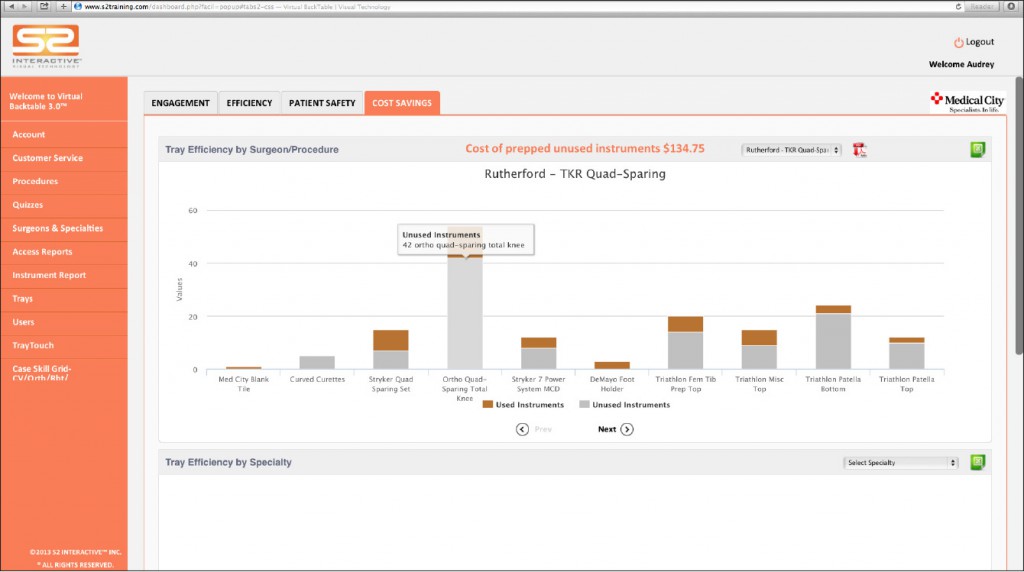
The program charts used and unused instruments per tray by surgeon and procedure plus the cost of unused instruments.
The Virtual Backtable is also useful for streamlining instrument trays. Once staff members take the instruments out of the trays and drag them to the mat, they can see which instruments and how many are used from each tray.
The program automates this information, which can be accessed via a drop-down menu that charts used and unused instruments per tray by surgeon and procedure, as well as the cost of unused instruments (see image on previous page). These data can be exported to an Excel document or pdf, and the surgeons and OR manager can look at instrument use tray by tray.
Parnell says they found that one of their major instrument trays was being pulled for a procedure, and only three of the 112 instruments were being used. They added those three instruments to another tray they use regularly for the procedure, so the major tray no longer needs to be reprocessed over and over for three instruments.
“It’s this kind of information that takes OR managers months, if not years, to collect because they have to put someone in the OR to count the instruments used manually, and the Virtual Backtable does it automatically,” says Foster.
“The Virtual Backtable has really helped us streamline our instrumentation,” says Hensell.

Central supply personnel can show if an instrument is missing or present in a tray.
Another feature of the Virtual Backtable is Tray Touch, which assists central supply personnel in locating instruments in specific trays and provides cleaning instructions, safety warnings, and assembly/disassembly instructions.
“If I am in central supply and managing the assembly and inspection of trays, I need to see a visual layout of that, and that’s what we give them,” says Foster.
Because all of the trays and instruments are already photographed for the Virtual Backtable, central supply personnel can touch an instrument and an arrow will show them where the instrument belongs in the tray. This allows any tray to be assembled quickly and correctly. After the tray is assembled, a pdf of the tray contents can be printed that lists all of the instruments present and notes if something is missing.
Tray Touch is also used for vendor trays, which are photographed and added to the program.
When a vendor brings in a tray, central supply personnel inspect it and note in Tray Touch if an instrument is missing or present by touching missing or available on the screen, or they can select all if nothing is missing (image, p 9). A printout of this is put with the tray.
“This is not an instrument management system that costs thousands of dollars. This is a very economical way to improve the efficiency of the central supply staff in putting together trays,” says Foster.
Methodist put computers in central supply at the workstations so staff would have access to Tray Touch.
If experienced staff don’t want to use Tray Touch to put together a tray instrument by instrument, they can check their tray against the tray on the screen when they are finished, says Parnell. “It’s important they put the instruments back in the same place as the picture because the software program is designed so that it shows an arrow telling that person in the OR where the instrument is in the tray,” she says.
The Virtual Backtable can also be linked to instructions for use (IFU) for instrument assembly and cleaning. “We click on the instrument, and we get the manufacturer’s IFU,” says Parnell.
Central supply personnel can use this information for reprocessing, or scrub personnel can use it if they need help assembling an instrument for a case.
Having been in the medical device industry for many years, Foster anticipated the rise of the rep-less model. In August, Smith & Nephew, Europe’s largest maker of artificial joints, announced it would offer a rep-less service that could cut costs for US customers by 40% to 50%. The new company offering this service is Syncera.
To support the rep-less model with the Virtual Backtable, Foster asks the OR staff to take photographs of the way the OR is set up, the instrument and equipment setups on the Mayo stand and the backtable, and the device trays. They can also capture videos of surgeon-specific instrument and device assembly, which is easily loaded into the software via the iPad or PC.
In addition, Foster and his team have put together a checklist for the trays that must be completed by central supply as well as checklists for other aspects of the procedure.
At the end of a procedure, implants that were used can be reordered with the touch of a button on the iPad or PC. The implant sizes and barcodes are already in the program.
“I have tried to put as much functionality as possible into the program,” says Foster. “If you think about everything the rep does to get ready for and to support the procedure, our software can do that.”
Foster adds that typically when an OR goes rep-less, someone trains the scrub person for a procedure and double-scrubs for the first 15 or 20 cases to make sure everything is done correctly. With the Virtual Backtable, the scrub person’s competence is documented before scrubbing for a procedure.
Foster notes that some companies he is working with are proposing that hospitals implement a 75% to 80% simulation score in the Virtual Backtable before staff scrub for a rep-less procedure.
More and more hospitals will be getting on board with the rep-less model, according to Foster. “It’s the way of the future,” he says. ❖
Hirschler B. Smith & Nephew offers low-cost hip, knee service in US. Reuters. August 1, 2014. http://finance.yahoo.com/news/smith-nephew-offers-low-cost-083126255.html.
Lunardini D, Arington R, Canacari E, et al. Lean principles to optimize instrument utilization for spine surgery in an academic medical center: An opportunity to standardize, cut costs, and build a culture of improvement. Spine. 2014;39(20):1714-1717.
Stockert E W, Langerman A. Assessing the magnitude and costs of intraoperative inefficiencies attributable to surgical instrument trays. J Am Coll Surg. 2014;219(4):646-655.